
TECH
I'm the dude, the guy, yep that guy, everybody has a guy or knows a guy I'm that guy.
Recent Threads
Posts
Log in to create a post.
REC Addon for Zeds
Addon script I made to Trigger a ZEDS prim animation and hide the folded top. Also triggers windows down with default "wswitch" Window notecard window switch command.
integer pluginAPI = 2565;
list APIbuttons = ["Roof"];
string lAnimName = "Convertible";
integer lFrameMax = 11;
float lFrameDelay = .5;
string lSoundOpen = "49716d20-6a73-b46b-511d-7ec53ce2e515"';
string lSoundClose = "49716d20-6a73-b46b-511d-7ec53ce2e515";
float lSoundVolume = 1.0;
topup()
{
integer x = llGetNumberOfPrims();
for (; x >= 0; --x)
{
if (llGetLinkName(x) == "Folded")
{
llSetLinkPrimitiveParamsFast(x,[
PRIM_COLOR, ALL_SIDES, llGetColor(x) , 0.0]);
}
}
}
topdown()
{
integer x = llGetNumberOfPrims();
for (; x >= 0; --x)
{
if (llGetLinkName(x) == "Folded")
{
llSetLinkPrimitiveParamsFast(x,[
PRIM_COLOR, ALL_SIDES, llGetColor(x) , 1.0]);
}
}
}
integer lSwitch = 0;
integer lFrame = 0;
list main_menu = [];
integer listen_handle;
integer Switch = FALSE;
drawMenu(key user)
{
llListenRemove(listen_handle);
integer rand_chan = (integer)llFrand(10000)+10;
listen_handle = llListen(rand_chan, "", user, "");
llDialog(user, "settings", main_menu, rand_chan);
}
default
{
on_rez(integer num)
{
llResetScript();
}
state_entry()
{
llSetMemoryLimit(llGetUsedMemory()+1024);
llMessageLinked(-1,-2,llDumpList2String([lAnimName,lFrame],"|"),"");
llSetTimerEvent(0);
}
link_message(integer sender_num,integer num,string message,key id)
{
if(num == pluginAPI)
{
if(message == "getButtons")
{
llMessageLinked(LINK_SET, pluginAPI, "setButtons:"+llDumpList2String(APIbuttons,"|"), "");
}
else if(message == llList2String(APIbuttons,0))
{
llMessageLinked(LINK_SET,1,"wswitch","");
if(lFrame == 0){
lSwitch = 1;
llSetTimerEvent(lFrameDelay);
}
else if(lFrame == lFrameMax){
lSwitch = 0;
llSetTimerEvent(lFrameDelay);
}
llMessageLinked(LINK_SET, pluginAPI, "Back", id);
}
}
}
timer(){
if(lSwitch){
if(lFrame == 0)
llPlaySound(lSoundOpen,lSoundVolume);
lFrame++;
if(lFrame == lFrameMax)
llSetTimerEvent(0);
topdown();
}
else{
if(lFrame == lFrameMax)
llPlaySound(lSoundClose,lSoundVolume);
lFrame--;
if(lFrame == 0)
llSetTimerEvent(0);
topup();
}
llMessageLinked(-1,-2,llDumpList2String([lAnimName,lFrame],"|"),"");
}
}
TX Gear Remote Vehicle Access
This tutorial is quite long and detailed. We encourage you to download it to your computer and view it.
DOWNLOAD
TX Gear Sirhan Interceptor
This tutorial is very detailed we encourage you to download it to your computer and extract it - it makes it easier to go through.
DOWNLOAD
TX Gear Grid Chat
Follow this guide to set up your new TX Gear Grid Chat
- Unzip the gridchat file and open gridchat.php with Notepad or other text editor. Find this line, should be line 33. if ($key != "YOUR_SECRET_PASS_HERE") { die(); } /* Set this to the same Secret Key as in your chat servers Logger Settings Notecard */
- Where it says YOUR_SECRET_PASS_HERE create your own Secret Key. Do not share it with anyone.
- Now go the contents of your Chat server in world and open the Logger Settings notecard. On the last line, after Secret Key= put your secret key. Save the notecard.
- Now, upload the gridchat folder, to your web host inside your public_html directory. Now it should be located at http://yourwebsite.com/gridchat (yourwebsite.com being your websites address).
- Now, in the Logger Settings notecard inside your chat server find Logger Location= and put the location of your gridchat.php file as mentioned in step 4.
- Now find Chat Location= in the notecard and put the location of the web chat which will be similar, http://yourwebsite.com/index.html note, this is the index file, not the php file we used before. We can ignore the rest of that notecard for now, so just save and close it.
- Next, go to http://tx-gear.com/dns/dns_generate.php and click the Generate button. It will generate a uuid, copy and paste this and put it in the description field of your Chat Server.
- Reset the chat server using your build menu, or re-rez it. In Local Chat it will spit out another uuid. Put this uuid in the description of your Grid Chat HUD and re rez it.
- Open the Grid Chat HUD and then the Chatter Settings notecard in it. Find Chat Location= and put the same address we used in the chat server notecard. ie: http://yourwebsite.com/index.html You may also re rez it.

Thats all there is to it. You can set whatever perms you want on your Grid Chat HUD and distribute it to those you wish to chat with, Grid wide.
Additional Info:
Additional Chat Server notecard settings:
# chat server default state after sim restarts 0 is off, 1 is on
# chat server default state after sim restarts 0 is off, 1 is on
Logger Default State=1
Auto Clear chat log on server at sim restarts (Keeps the log file minty)
Auto Clear Sim Restart=1
open relay chat from other items (such as TX Destinations HUD) 0 is off, 1 is on
Open Relay=1
open relay chat channel for other items (such as TX Destinations HUD)
Open Chat Channel=-96
Notes: Open Relay must be on, 1 to use Auto Announcer. Also a good idea to clear the chat log to keep the log file from getting too big, so we have made it so it will clear automatically on sim restarts (weekly) as long as that is set to 1.
Additional Chat HUD notecard settings:
Message wearer sees when they click the logo
#
Logo Click Text=TX Gear your complete one stop full permission vehicle builder shop, featuring over 1700 full perms shells, hundreds of parts, REC Basic vehicle scripts and much much more. Built by a Builder, for Builders. Dont forget to Join Our Group for updates and Freebies and Help! [secondlife:///app/group/75e2dd9d-2be0-efa6-c78e-48fb4534d173/about TX Gear Gearheads]
#
Owner only = 1, Open Chat = 0
Owner Only=1
#
HUD Positioning (and repositioning)
Open Pos=<0.00000, -0.398, -0.084>
Hid Pos=<0.00000, 0.362, -0.084>
NOTE: AS of V2 Domain and Key go at the top of the HUD notecard.
ie:
ie:
Domain=http://yourdomaincom
Public Key=cef0b4a9-dbb3-49fd-c440-b96a79e61a4a (generated by the Chat server)
These are pretty self explanatory. Default attach position is top left - but it can be changed by simply repositioning it manually and copying the values you see in your viewer to the notecard.
These are pretty self explanatory. Default attach position is top left - but it can be changed by simply repositioning it manually and copying the values you see in your viewer to the notecard.
Getting position values to move HUD screen position.
Using Auto Announcer:
Auto Announcer is great if you want to stream ads for your business or club announcements directly into your chat stream. Its configuration is pretty simple.
In the Announcer description field you will see 120:-96
In the Announcer description field you will see 120:-96
120 is the seconds between announcements and -96 is the channel used by your Chat Server when Relay is on.
Then, just fill out the notecard in the Announcer, one line per announcement. Click to turn it on or off.
Radio on HUD:
Edit Linked the Radio button on the HUD to change the streams available in the radio. Note: If worn by someone with Land rights, it can be used to change the land stream.
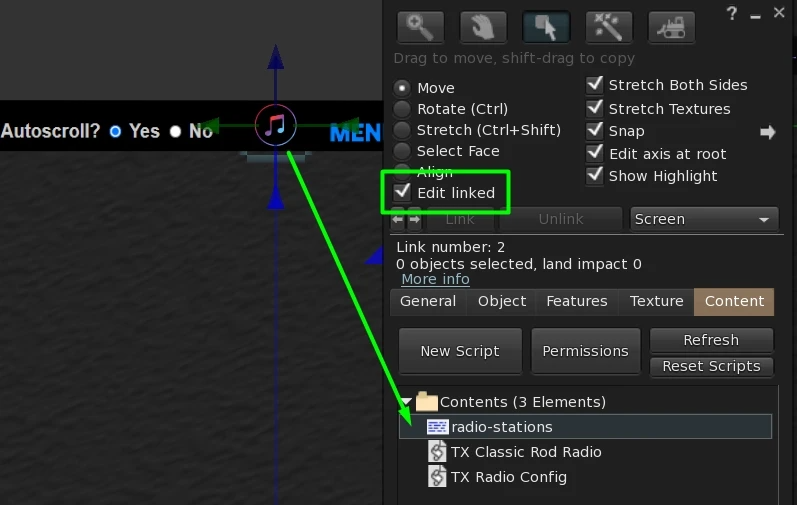
Edit radio stations.
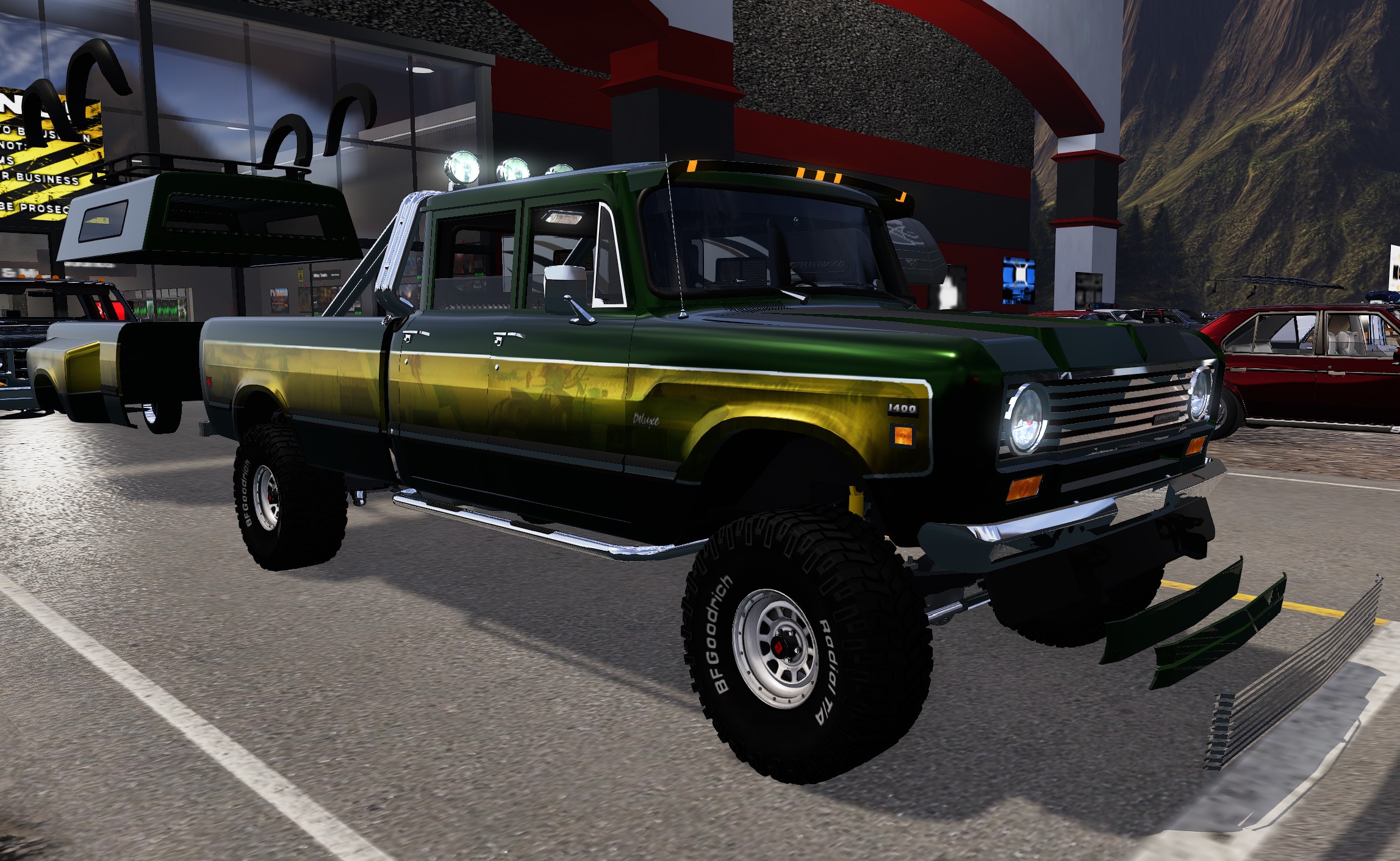

This beast is about four models put together
A couple F150's - an F250 - engine out of an F350 and the front clip and chassis of an F800 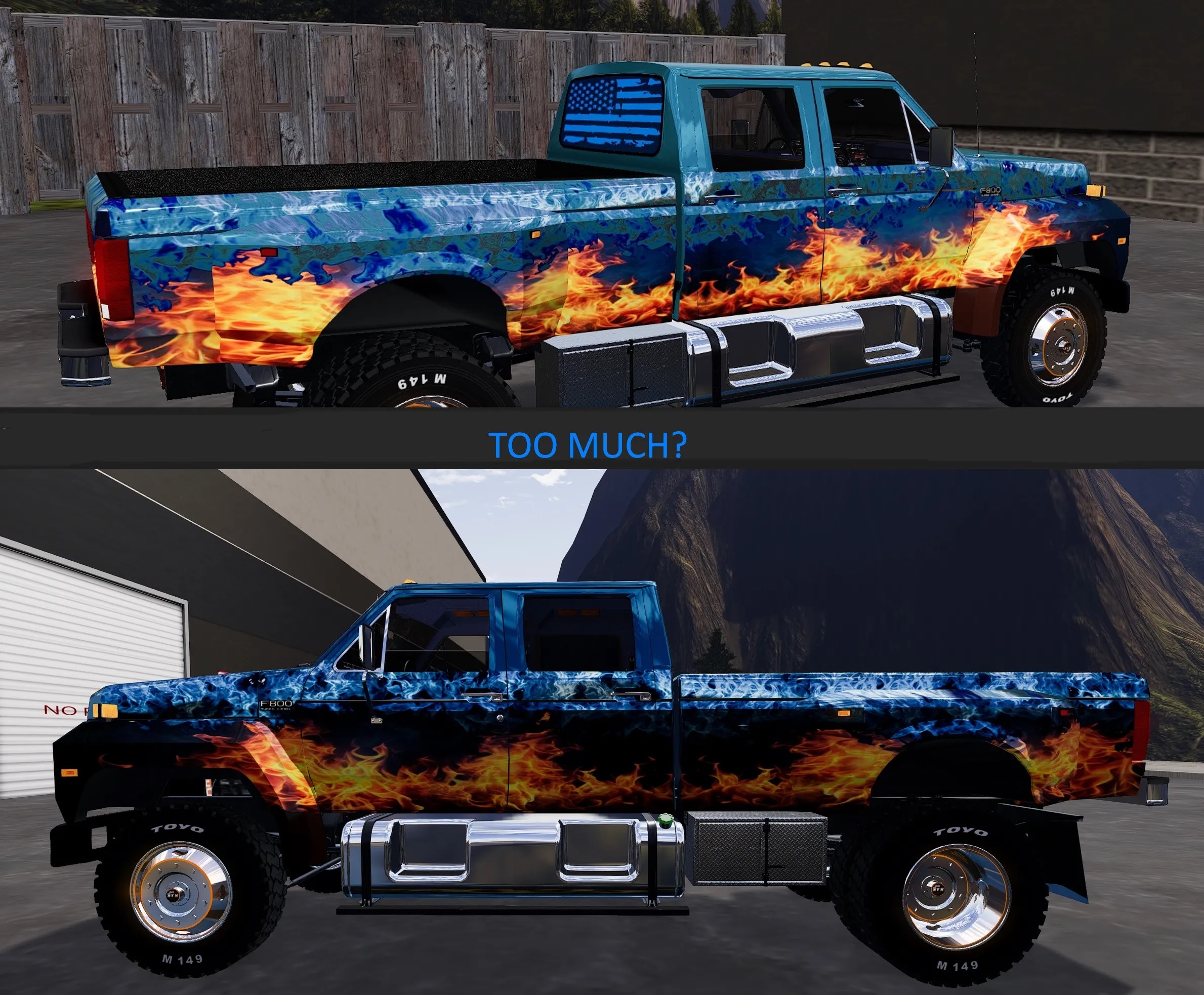

Chev 4500 Rollback
This will be brief as most everything you need to know about operations is shown in the videos.
We'll start with getting in, ignition and loading and unloading a vehicle.
Menu can be had 3 ways. Click BUTTON HUD, or Top rear of cab, or dashboard. Get a BUTTON HUD by sitting in cab and clicking dash or top rear of cab then Options>BUTTON HUD.
Once running, you shift gears with pg up and pg down, reverse is the lowest gear followed by Neutral then gear 1 etc. "Gas pedal" is W or Up arrow, "Brakes" is S or down arrow. A fast double tap of S or down arrow is instant stop - or ebrake for an incline. Contact me if you prefer an Automatic Transmission and I'll send you one.
Menu can be had 3 ways. Click BUTTON HUD, or Top rear of cab, or dashboard. Get a BUTTON HUD by sitting in cab and clicking dash or top rear of cab then Options>BUTTON HUD.
Most everything you'll need access to is in the Main page of the menu. Addons button takes you to the Addons where resides Fuel on/off and Stats. Options are various on the fly options you can change.
You can also let others unlock and use your Rollback. They will need the group tag the Rollback is in and you will need their Legacy name to add to the lock/unlock button notecard inside the cab. To access the notecard, open edit and tick edit linked and select the lock/unlock button and edit the notecard in its contents.
People in the access list can then unlock the vehicles menu and operate the vehicle. To operate the vehicle "chain" button they only need Group access and the chain button set to group. See first video for that toggle
People in the access list can then unlock the vehicles menu and operate the vehicle. To operate the vehicle "chain" button they only need Group access and the chain button set to group. See first video for that toggle
Drag Chute
Thanks for your purchase! If you are the end user and not the builder, you can delete the script 'OwnerSay Pos Size Rot Getter - delete after chute is set up.' out of the Chute.
Step one link the bag and chute to your car. open the Chute script, find the setup_on global and set it to TRUE
integer setup_on = TRUE;
integer setup_on = TRUE;
Step two, position and resize the chute where you want it in relation to the bag and click it. The 'Getter' script in the chute will give you a position, rotation and size. Put those numbers in the appropriate globals in your Chute script. Typically youre just looking to set its deployed and packed position size and rotation right now.
Step three, click the bag again to 'pack' the chute. It may get tricky now as the chute hides when packed. Use Ctrl Alt T to see hidden objects and locate it. Position and resize it to its 'packed' position and click it again to get numbers a second time. Put those numbers in the appropriate globals in your Chute script.
Step four, lets add some chute wobble. With the chute deployed rotate it to the left and click it - copy the numbers for rotation and put them in pos1 in your chute script globals pos1. Now rotate it to the right and click it. Put those rotation numbers in pos2 in your chute script globals. You can now save for the last time and click your bag to close your chute.
Step five, open the Chute script, find the setup_on global and set it to FALSE
integer setup_on = FALSE;
Step five, open the Chute script, find the setup_on global and set it to FALSE
integer setup_on = FALSE;
Step six, in the bag description, put the number below which the chute will NOT DEPLOY when letting off the gas, example, if you dont want it deployng under 125, then in your bag description put 125.0 Do not forget the decimal point. It's a float not an integer.
Custom work and dae files.
Dae files:
dae files are now exclusively handled via my Patreon - If you want one of my dae let me know and I will get it put up on Patreon for you.
dae files are now exclusively handled via my Patreon - If you want one of my dae let me know and I will get it put up on Patreon for you.
Custom Orders cost is as follows.
Must be something I think MAY sell.
Special Orders are a vehicle you wish to have, but we are both able to sell. Special Orders are 3500. Also now required on Special orders is 2000 down, as people have decided to make orders and not pick them up. *
The reason for the price is simple, I have to gauge the items resell-ability. Ie: just because you want it doesn't mean anybody else will so I may only sell one. Its a gamble on my part.
Exclusive.
Exclusive is something only YOU will have resell rights to, not me, not anybody else. 20K Lindens up front. *
*Note: I do not accept money, until im reasonably sure I can produce the item.
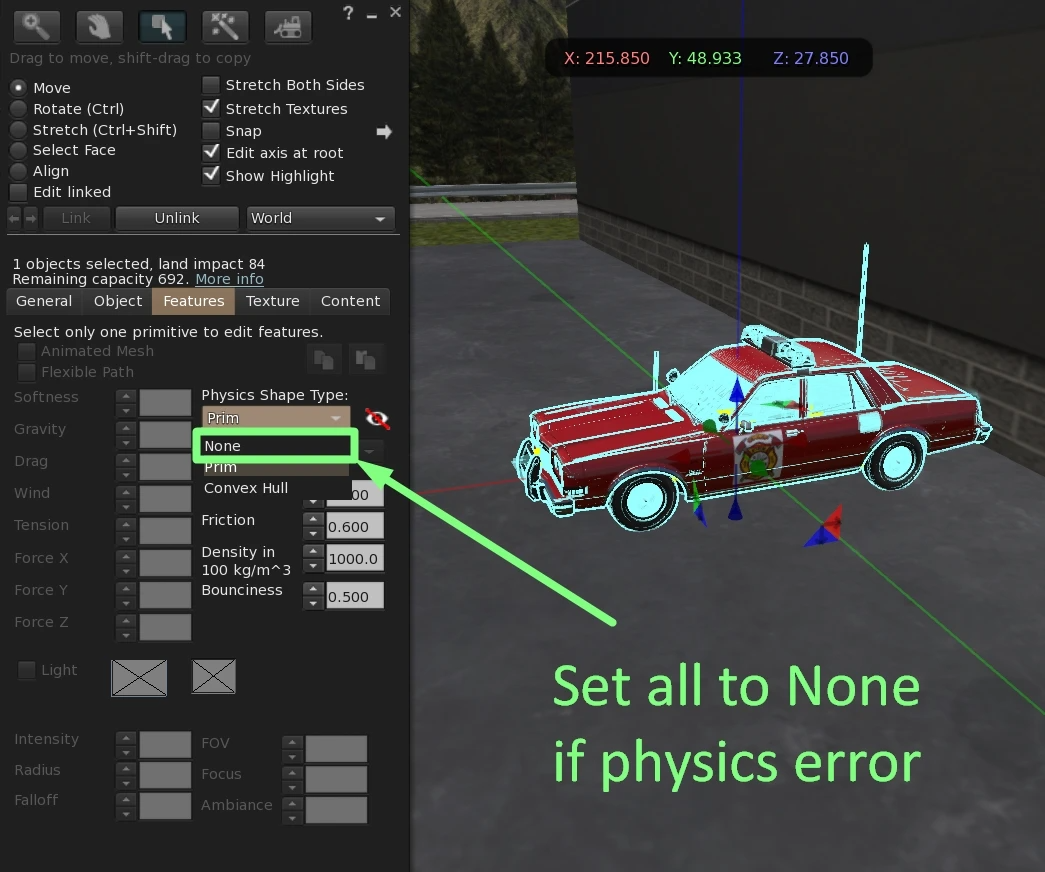
Get your own root sled
Step one, download the mesh.
Step two, upload it.
BIKE ROOT SLED - use same process
Resell Rights and TOS
What resell rights do I have as a TX Gear Customer?
The majority of our customers are skilled vehicle builders who buy our shells and script them for resale, either on the Marketplace or their own in world stores.
The majority of our customers are skilled vehicle builders who buy our shells and script them for resale, either on the Marketplace or their own in world stores.
Their resale permissions on a Full Perms vehicle shell (or other mesh part), or our created scripts, should be one of the following but not all three.
TYPICAL PERMISSIONS WHEN SELLING YOUR MINTY FRESH NEW CREATION:
Object: No Transfer on the General Tab
Contents: No Modify, No Transfer
Object: No Transfer on the General Tab
Contents: No Modify, No Transfer
Exceptions to the above rules are of course Notecards required for documentation/configuration or configuration scripts. For example, Lighting Notecards for REC Basic, have to be full perms to function properly, and REC Basic Vehicle Config can be left Modify if wanted.
Stuff you get at our Raffle or I give away via the group or otherwise falls under this blanket TOS.
--------------------------------------------------
Stuff you get at our Raffle or I give away via the group or otherwise falls under this blanket TOS.
--------------------------------------------------
TX Cargo CHAIN script (JUST THE CHAIN) may also be passed copy transfer as it is required to be so to be put in people vehicles. Also excluded in this rule are Vehicle Remotes that allow people to drive other peoples vehicles. Those may be sold Copy/Transfer.
-------------------------------------------------
-------------------------------------------------
THE ONLY OTHER EXCEPTION TO THESE RULES REGARDING PERMISSIONS ARE LICENSED RESELLERS OF TX GEAR SHELLS AND SCRIPTS. THOSE LICENSE HOLDERS HAVE PAID FOR THEIR LICENSES.
------------------------------------------------
------------------------------------------------
IF YOU HAVE PURCHASED A RAW DAE FILE FROM TX GEAR, YOU ALSO HOLD A FULL PERMISSIONS LICENSE, FOR THAT DAE ONLY.
ADDITIONALLY ONCE YOU OWN THAT DAE, UPLOADING IT IS YOUR RESPONSIBILITY AND YOURS ALONE, IF YOU DO NOT KNOW WHAT YOUR DOING THEN I WOULDN'T ADVISE BUYING DAE FILES.
As of 10/25/2024 Models with this level of license are sold through my PATREON ONLY - but if you see one you want in world and not on site - shoot me a notecard and I'll make it so.
Resell Rights and TOS
What resell rights do I have as a TX Gear Customer?
The majority of our customers are skilled vehicle builders who buy our shells and script them for resale, either on the Marketplace or their own in world stores.
The majority of our customers are skilled vehicle builders who buy our shells and script them for resale, either on the Marketplace or their own in world stores.
Their resale permissions on a Full Perms vehicle shell (or other mesh part), or our created scripts, should be one of the following but not all three.
TYPICAL PERMISSIONS WHEN SELLING YOUR MINTY FRESH NEW CREATION:
Object: No Transfer on the General Tab
Contents: No Modify, No Transfer
Object: No Transfer on the General Tab
Contents: No Modify, No Transfer
Exceptions to the above rules are of course Notecards required for documentation/configuration or configuration scripts. For example, Lighting Notecards for REC Basic, have to be full perms to function properly, and REC Basic Vehicle Config can be left Modify if wanted.
Stuff you get at our Raffle or I give away via the group or otherwise falls under this blanket TOS.
--------------------------------------------------
Stuff you get at our Raffle or I give away via the group or otherwise falls under this blanket TOS.
--------------------------------------------------
TX Cargo CHAIN script (JUST THE CHAIN) may also be passed copy transfer as it is required to be so to be put in people vehicles. Also excluded in this rule are Vehicle Remotes that allow people to drive other peoples vehicles. Those may be sold Copy/Transfer.
-------------------------------------------------
-------------------------------------------------
THE ONLY OTHER EXCEPTION TO THESE RULES REGARDING PERMISSIONS ARE LICENSED RESELLERS OF TX GEAR SHELLS AND SCRIPTS. THOSE LICENSE HOLDERS HAVE PAID FOR THEIR LICENSES.
------------------------------------------------
------------------------------------------------
IF YOU HAVE PURCHASED A RAW DAE FILE FROM TX GEAR, YOU ALSO HOLD A FULL PERMISSIONS LICENSE, FOR THAT DAE ONLY.
ADDITIONALLY ONCE YOU OWN THAT DAE, UPLOADING IT IS YOUR RESPONSIBILITY AND YOURS ALONE, IF YOU DO NOT KNOW WHAT YOUR DOING THEN I WOULDN'T ADVISE BUYING DAE FILES.
As of 10/25/2024 Models with this level of license are sold through my PATREON ONLY - but if you see one you want in world and not on site - shoot me a notecard and I'll make it so.